

Wardrobe apps, compared · 2027 guide
The Best Wardrobe Apps in 2027 for Easy Outfit Planning
A clear closet. An easy place to create. A plan for what comes next.
A wardrobe app becomes useful when you can open it, find your clothes, and start putting a look together without working out where everything lives. Good design makes the features feel connected: the outfit you create should be easy to find, plan, wear, and revisit.
We compared Alamoda, Fits, Alta, Acloset, Whering, Indyx, and Stylebook with that everyday experience in mind. Our first pick is Alamoda for a clean, all-in-one wardrobe and outfit-planning experience: a flexible outfit editor, AI styling, community discovery, member-to-member Moda Chat, and shared-trip coordination in one app.
Features and US prices checked October 20, 2026
Start here
Which Wardrobe App Is Right for You?
-
Our top pick for a clean, all-in-one experience. Organize your wardrobe, create outfit boards, try community looks, message members in Moda Chat, and coordinate outfits for shared trips.
-
For visual outfit building and everyday planning. Swipe through clothing combinations, make collage boards, and use a calendar, AI stylist, and virtual try-on.
-
For AI-led daily styling and avatar previews. Get wardrobe-based suggestions, preview looks on a personal avatar, and generate travel outfits and packing lists.
-
For conversational AI styling. A digital closet with Style Chat, personalized suggestions, photo-based item extraction, and avatar try-on.
-
For a free core wardrobe and social styling. Browse closets, style friends, collect inspiration, and plan what to wear.
-
For a digital wardrobe with human styling. Build your closet and outfit boards, then optionally work with a professional stylist.
-
For detailed planning with a one-time purchase. An iPhone and iPad wardrobe organizer with a freeform canvas, calendar, packing, and statistics.
Seven approaches to the same wardrobe
Best Wardrobe Apps Compared at a Glance
All seven apps support visual wardrobe organization and outfit planning. These differences help narrow the choice.
| App | Best suited to | Standout features | Price model |
|---|---|---|---|
| Alamoda | All-in-one creation, styling, and coordination | Moda Lens; creative editor; Explore-to-Try-On; Outfit Check; Moda Chat; shared trips | Free starter tier; memberships from $4.99/month |
| Fits | Visual outfit building and everyday planning | Swipe outfit maker, collage boards, AI stylist, calendar, virtual try-on | Free unlimited items and outfits; optional Fits Pro |
| Alta | AI-led daily styling and avatar previews | Closet/weather suggestions, avatar try-on, calendar, travel lookbooks | Currently advertised as free to use |
| Acloset | Conversational AI styling | Style Chat, recommendations, avatar try-on, packing | Free up to 100 items; subscriptions and Beans |
| Whering | Free core wardrobe and social styling | Canvas, Dress Me, weather suggestions, friend styling | Free core; optional paid tools and credits |
| Indyx | Wardrobe planning with optional human advice | Outfit boards, shared closets, stylist Lookbooks, Virtual Selfies | Free core; Insider and styling purchased separately |
| Stylebook | Detailed planning on Apple devices | Freeform layering, Outfit Shuffle, calendar and packing | $4.99 one-time US purchase |
Paid features and limits differ by app. US prices are shown where stated; storefront prices and offers can vary. The sections below link the official feature and pricing sources.
What makes an app easy to live with?
Clean Design Should Help You Use Your Wardrobe
A beautiful interface needs to support real decisions. Can you recognize items at a glance? Is there a clear starting point for an outfit? Can you reach the controls you need without losing sight of the clothes?
For this guide, we looked at closet organization, the outfit-building flow, how inspiration connects to action, and how saved looks fit into everyday plans. We also considered platform availability and what is included before and after payment. Each recommendation explains the experience an app offers, with official links for feature and pricing details.
01 · Our top pick
Alamoda: A Clean Wardrobe, a Powerful Editor, and One Connected Experience
Our top pick for people who want to organize, create, discover, try on, and plan together—not keep each part of their style life in a different app.
Alamoda combines a visual wardrobe and powerful outfit editor with Moda AI, Explore, member-to-member Moda Chat, and shared travel planning. The strength is the connection between them: collect pieces, create a look, discover a community outfit, preview it on yourself, discuss plans with another member, and coordinate what to wear for the same trip or event.
- Create with control: Moda Lens, editable outfit boards, four starting layouts, custom text, and styling details.
- Take inspiration further: Explore outfits, available product links, Try This Look, Outfit Check, and visual improvements.
- Make style social: Follow creators and talk directly with other Alamoda members in Moda Chat.
- Plan together: Invite eligible members to shared trips, coordinate event outfits, and keep the conversation in trip chat.
A clear home for your clothes
Clothing, shoes, bags, and accessories stay organized in a visual wardrobe, with categories and filters to help you find a piece. Background removal makes item photos easier to read. With Moda Lens, you can identify visible pieces in an outfit photo, choose what to keep, generate separate product-style images, and review the details before saving.
That review step matters: you stay in control of what enters the closet. Save the selected pieces together, or carry them directly into the Outfit Creator while the idea is fresh. One photo can become several reusable wardrobe items and the beginning of a new outfit. See the complete Moda Lens flow.
An outfit editor with a simple starting point
Alamoda separates outfit creation into four stages: Details, Core Items, Accessories, and Canvas. You choose the clothing first, then focus on the composition. Four layouts—Smart Arrange, Editorial, Centerpiece, and Grid—give you an immediate starting point.

From there, move, resize, rotate, and layer pieces. Add custom or preset text, shapes, stickers, emoji, and supported effects. Guides, snapping, and undo/redo help you refine the board. Smart Arrange uses layout rules rather than generative AI, so it provides a predictable composition you can continue editing.
The controls respond to the selected object, bringing the relevant options into focus as you work. A saved outfit retains its editable canvas, so you can return to the composition and refine it later. This is an important part of Alamoda’s design: a quick beginning, room for creative control, and a finished board that remains connected to the clothes behind it. Explore the full Outfit Creator guide.
Explore that gives inspiration a next step
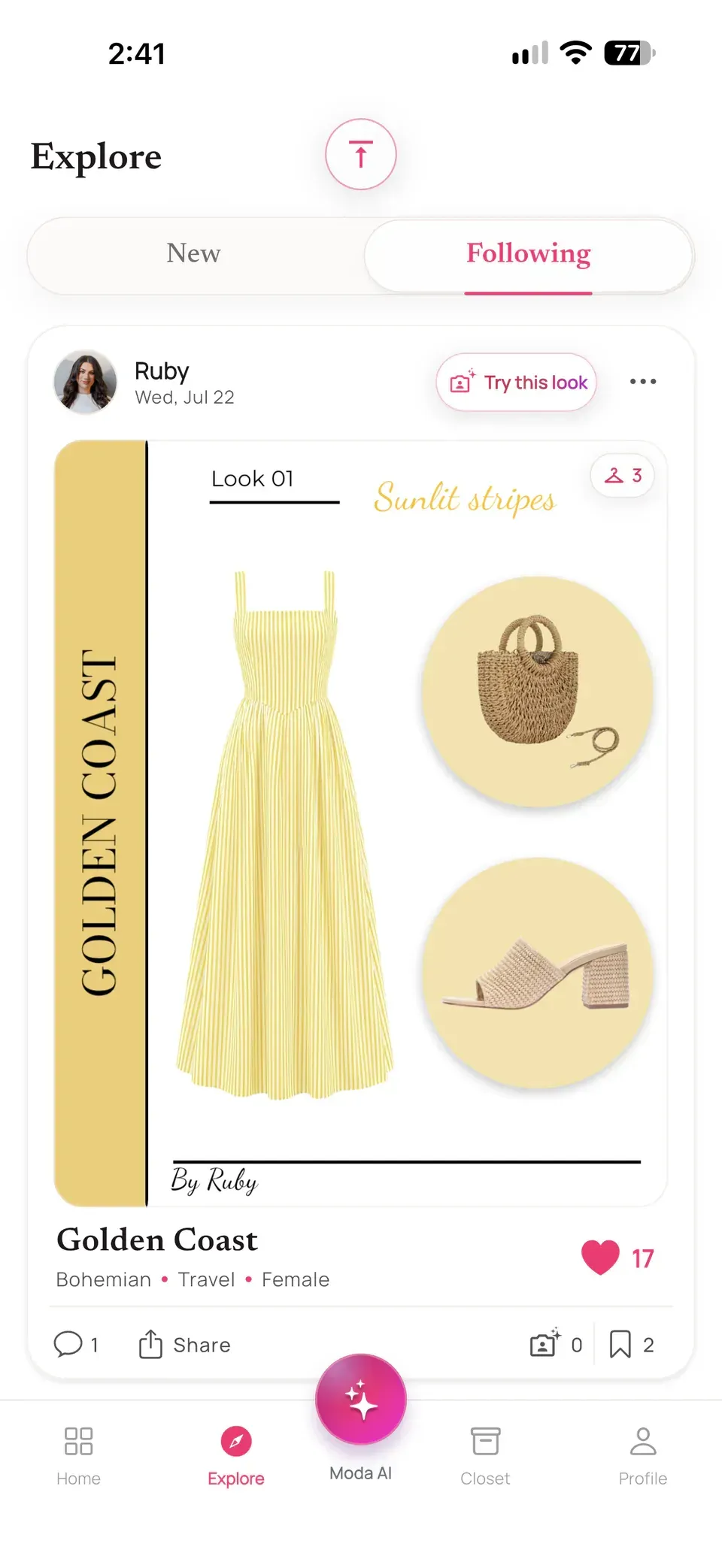
Alamoda’s Explore experience puts the outfit board at the center, with creator and engagement controls around it. Browse public looks, follow creators, and like, comment on, save, or share outfits. Open a look to inspect its pieces; when a creator has attached a product or source link, you can visit that page.
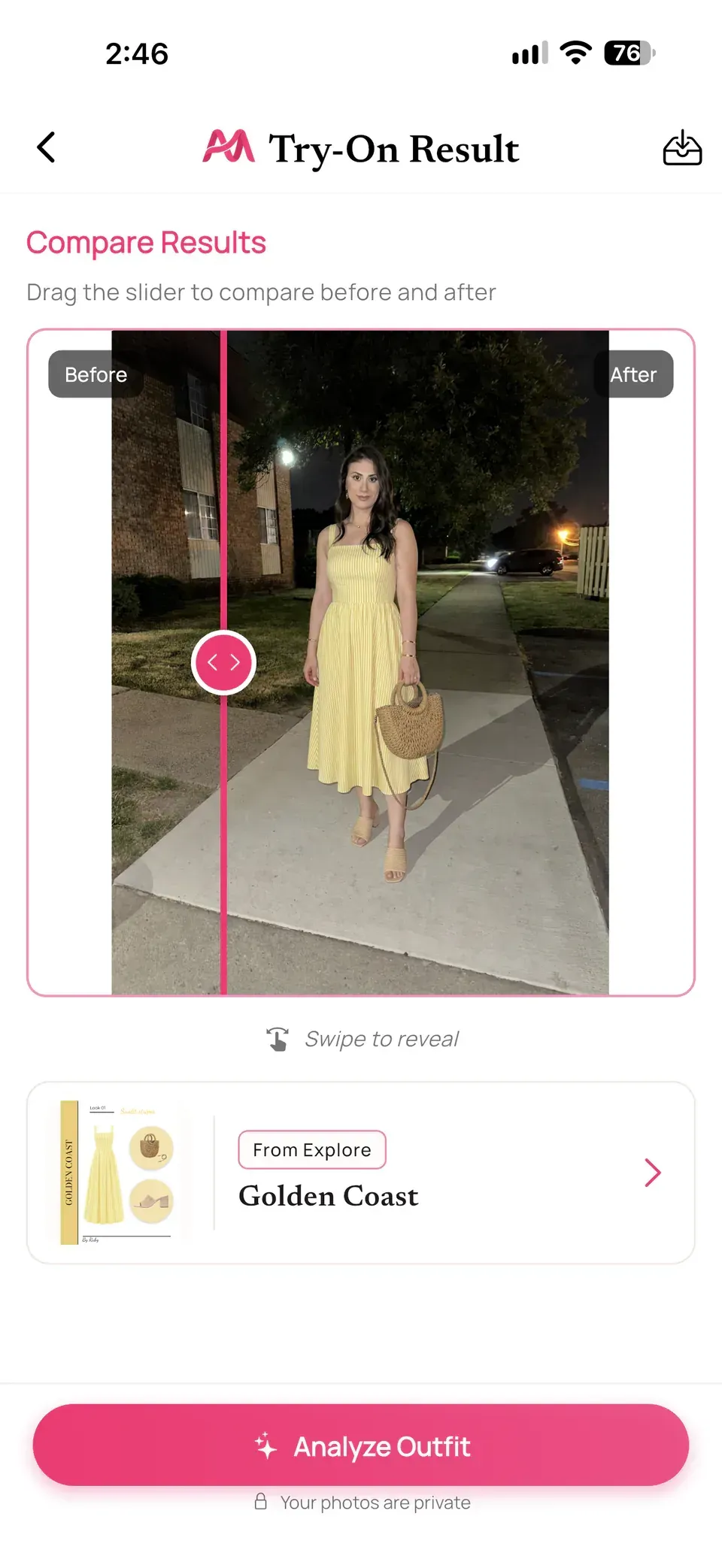
On an available look, Try This Look carries the outfit directly into Moda Try-On. Add your photo and create a visual interpretation of the style. Then compare before and after, save the result, or send the preview to Outfit Check for another perspective. Discovery, personal visualization, and styling feedback stay connected. See how Explore connects to Moda Try-On and Outfit Check.
Outfit feedback for you, your partner, or your friends
Outfit Check supports a complete worn outfit, a flat lay, a coordinated couple’s look, or a group of friends. Add the occasion and optional weather context to receive a score, a category breakdown, and styling suggestions. That makes it useful for a date night, a group event, or checking how several looks work together.
With Improve Outfit, choose the suggestions you want to explore and add your own direction. Alamoda can generate an updated visualization using the original photo, helping you consider a different layer, shoe, accessory, or color combination. You can review feedback and then see a visual interpretation of the changes. Read about Outfit Check and Improve Outfit.
Moda Chat: talk with other Alamoda members
Moda Chat is member-to-member messaging, not an AI stylist conversation. Talk directly with other Alamoda users about outfit ideas, an upcoming occasion, or what you are planning to wear. Personal conversations and trip conversations have their own places in the inbox, keeping everyday chats and shared plans easy to find.
Share trips and coordinate what everyone will wear
Moda AI can suggest looks using eligible closet pieces and your selected style, occasion, and weather. Style My Week and Style My Trip extend that support across a schedule, with looks available for review and editing before you save your plans. See the weekly and travel-planning tools.
A shared trip is more than sending someone your packing list. Create a trip and invite eligible Alamoda members—family, friends, a partner, or other travel companions. Plan around the same itinerary and events, prepare individual outfit plans, and compare the group’s looks for an occasion. Keep packing and outfit decisions alongside the trip, with a dedicated conversation for coordinating together. Travel Planner and trip participation require Silver or Gold membership. Explore shared travel planning.
A Style Profile and insights that make it personal
Your Style Profile records preferences such as fit, colors, patterns, materials, cultural wear, and styling goals. Choose a seasonal palette, make your own, or use selfie-based analysis for color-harmony and seasonal suggestions. These preferences give your styling choices more personal context.
Moda Insights helps you revisit what happens after an outfit is saved: the pieces you wear most, items you have not worn, wardrobe utilization, and wardrobe value. Cost-per-wear uses recorded prices and logged wears. The result is a clearer view of your wardrobe habits as well as your wardrobe photos. Moda Insights is included in paid memberships. See the Style Profile and Moda Insights.
Platforms: iPhone and Android. Pricing: Free includes 20 items, two saved outfits, and four monthly AI credits. Monthly memberships are Bronze $4.99, Silver $7.99, and Gold $14.99; AI credit packs are also available. Compare membership features.
Other ways to organize and style
Six Other Wardrobe Apps to Consider
Fits: For Visual Outfit Building and Everyday Planning
Fits is worth considering if you like experimenting with clothing combinations. Its Dressing Room lets you swipe through pieces on a digital mannequin, while its freeform canvas supports outfit collages and mood boards. A calendar connects outfit creation with future plans and wear history. Official wardrobe and outfit tools.
- Two ways to create: Swipe through combinations or arrange clothes on a collage board.
- Connected planning: Calendar, packing lists, wishlists, and social wardrobe features.
- AI options: Styling suggestions, virtual try-on, and clothing-image enhancement; access depends on the feature and plan.
Platforms: iPhone, iPad, and Android. Pricing: Free includes unlimited wardrobe items and outfits. Optional Fits Pro adds AI stylist chats and suggestions, monthly AI credits, customization, and advanced statistics; monthly and annual subscriptions are available. Check Pro inclusions. Subscription options.
Alta: For AI-Led Daily Styling and Avatar Previews
Alta centers the experience on AI recommendations using your wardrobe, weather, and plans. It combines a digital closet with personal-avatar try-on, a style calendar, community looks, and travel outfits. It is a relevant option if you prefer receiving suggestions and previewing them before deciding what to wear. Official Alta features.
- Closet setup: Photo, database, and receipt imports, automatic item details, and Prettify garment images.
- Personal previews: Avatar setup and preferences inform the visual styling experience.
- Travel and shopping: Packing lists, multi-city travel lookbooks, shareable packing links, and wishlist sale alerts.
Platforms: iPhone, iPad, Android, and web. Pricing: Alta currently advertises the app as free to use. Setup guide. iOS listing. Android listing.
Acloset: For Conversational AI Styling
Acloset suits people who like asking a stylist questions and receiving wardrobe-based recommendations. Style Chat connects styling advice with tools for outfits, color, fit, and Rate Style. Official Style Chat tools.
- AI suggestions and previews: Wardrobe-based recommendations and an avatar that can preview wardrobe, wishlist, or recommended clothing. Feature FAQ.
- Photo extraction: Smart Detector can separate up to four garments or accessories from one image. Extraction tools.
- Packing support: Recommendations can consider packed clothes and destination weather. Packing tools.
Platforms: iPhone, iPad, and Android. Pricing: Free up to 100 wardrobe items. The US iOS listing shows Basic from $3.99/month, with other tiers and additional Beans purchases. View current Acloset pricing.
Whering: For Social Styling and a Free Core Closet
Whering combines a digital wardrobe with a social way to find ideas. Its appeal is bringing personal organization together with other people's style suggestions. Official features and recent updates.
- Social styling: Explore other closets, style friends, and collect outfit inspiration.
- Outfit planning: Canvas tools, Dress Me, weather-aware Planner suggestions, lookbooks, and packing lists.
- Core wardrobe storage: Unlimited total uploads, with some styling tools and extras purchased separately. Upload allowance.
Platforms: iPhone and Android. Pricing: Free core wardrobe, with optional paid tools and credit purchases. Check the store listing for current offers. Free-use FAQ.
Indyx: For Wardrobe Planning With a Human Stylist
Indyx combines visual closet organization with the option to work with a professional stylist. Paid Lookbooks bring another person's perspective into the wardrobe you have already cataloged. Official features and styling options.
- Everyday planning: Drag-and-drop outfit boards, calendar tracking, packing lists, and shared closets.
- Closet setup: Product-link and receipt imports, plus Enhance and Refine garment-image tools.
- Optional guidance: Professional stylist Lookbooks; Insider adds Virtual Selfies and deeper analytics. Current tools and memberships.
Platforms: iPhone, iPad, and Android. Pricing: Free core includes unlimited items and outfits. US iOS Insider is listed at $12.99/month or $74.99/year. Human styling is separate and starts at $60.
Stylebook: For Detailed Planning With a One-Time Purchase
Stylebook suits iPhone and iPad users who enjoy building and tracking their own wardrobe system. Its one-time purchase provides a different payment model from subscription-led apps. Official feature list.
- Outfit creation: A freeform canvas for layering and resizing, plus Outfit Shuffle combinations.
- Wardrobe tracking: A wear-history calendar, packing checklists, and cost-per-wear statistics.
- Current setup tools: AI background removal, bulk image import, and iCloud sync. Clothing-image generation requires a supported Apple Intelligence device. Current App Store tools.
Platforms: iPhone and iPad. Pricing:$4.99 one-time US purchase. Compatibility and purchase FAQ.
Make the choice around your routine
Our Pick for a Clean, All-in-One Wardrobe App
Choose Alamoda if you want a clear place to organize clothes, an editor you can start quickly and customize deeply, and connected tools for AI styling, discovery, and coordination. You can move from a wardrobe item to an outfit board, from an Explore look to a Try-On preview, and from a personal idea to a conversation or shared trip with other members.
Fits is worth considering for visual outfit building, Alta for AI-led suggestions and avatar previews, and Acloset for a chat-led AI approach. Whering offers free core storage and social styling, Indyx adds professional human advice, and Stylebook provides detailed planning through a one-time purchase on Apple devices.
For our priorities—clean presentation, creative control, useful AI tools, and the ability to connect with other members and plan together— Alamoda is our top all-in-one pick.
Common questions
Questions About Choosing a Wardrobe App
What is the best wardrobe app for beginners?
Look for a clear closet, easy photo handling, and an obvious first step for creating an outfit. Alamoda’s guided creation flow and editable layouts make it our pick for readers who want organization, creative tools, and planning together.
Which wardrobe apps are available on Android?
Alamoda, Fits, Alta, Acloset, Whering, and Indyx have Android apps. Stylebook is available on iPhone and iPad. Alta also offers a web app.
Which wardrobe app has a free option?
Alamoda, Fits, Alta, Acloset, Whering, and Indyx offer free access with different inclusions. Alamoda includes 20 items, two saved outfits, and four monthly AI credits; Fits includes unlimited items and outfits; Alta currently advertises free use; Acloset allows up to 100 items. Whering and Indyx offer unlimited core wardrobe storage, with paid extras.
Can I create outfits from clothes I already own?
Yes. All seven apps support creating outfits from a cataloged wardrobe. Their approaches differ: Alamoda emphasizes a guided, customizable canvas with connected AI and planning tools; other apps offer their own canvas, recommendation, shuffle, or stylist-led workflows.
Can a wardrobe app help plan outfits for a trip?
Yes. These apps offer forms of packing or outfit planning. Alamoda also supports shared trip events, participants’ outfit coordination, and trip chat for eligible members. Its Travel Planner and trip participation require Silver or Gold membership.
Can I chat with people and plan outfits together in Alamoda?
Yes. Moda Chat supports direct conversations between Alamoda members. Eligible users can also join shared trips, coordinate outfits for the same events, compare planned looks, and use trip chat. Moda Chat is separate from AI styling; shared travel features require Silver or Gold membership.
Does virtual try-on tell me which size to buy?
AI try-on is a visual preview of a style. It does not establish measurements, garment comfort, fabric behavior, or the correct size. Use retailer sizing information and physical measurements when deciding what to purchase.